Nella for browsers Available
Nella in your browser. Your assistant, on every page.
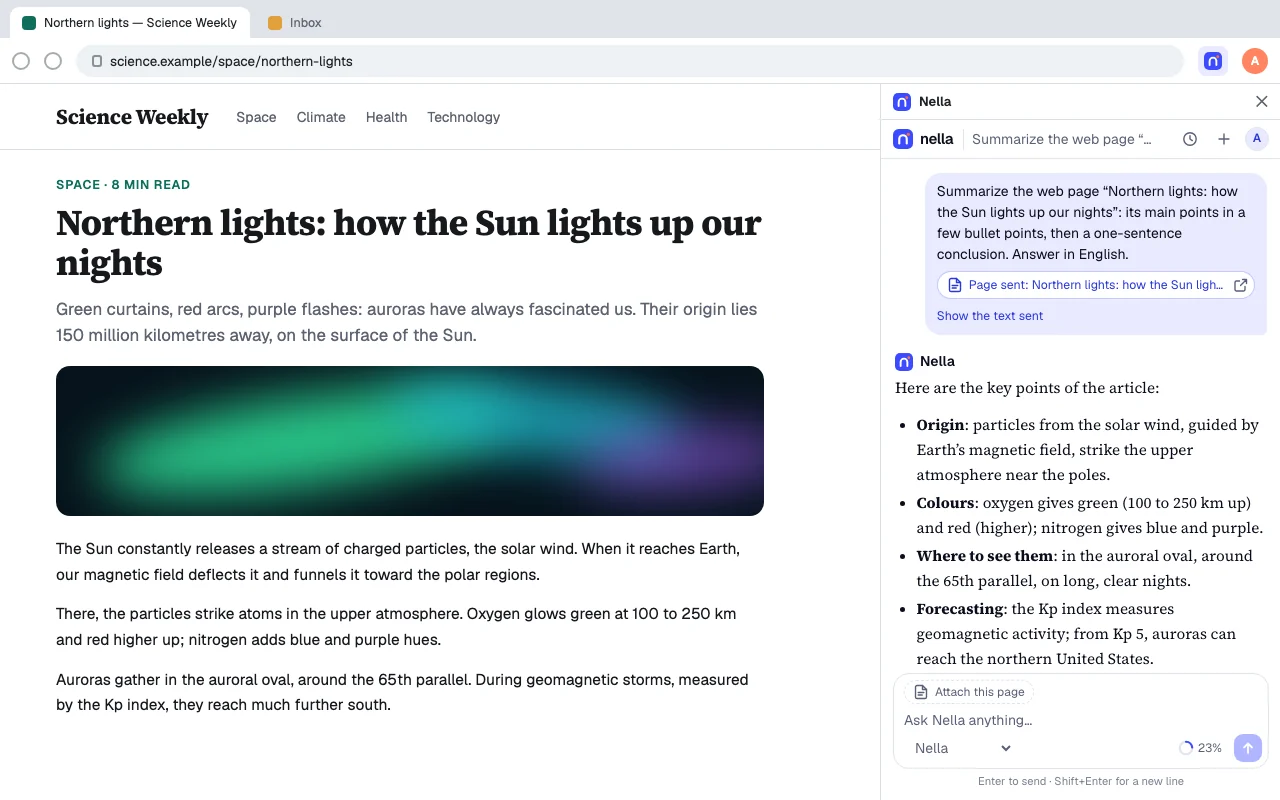
The extension for Chrome, Edge, Brave, Opera and Firefox: chat with Nella in the side panel, get the gist of the page you are reading, and have any selected text explained, translated, rephrased or corrected.
- Browsers
- Chrome, Edge, Brave, Opera, Firefox
- Opens with
- Side panel, Alt+Shift+N
- Systems
- Windows, macOS, Linux, ChromeOS
- Price
- Free to start
Designed for the web
The page you are reading and Nella, side by side.
-
Chat in the side panel
One click on the Nella button, or Alt+Shift+N: Nella opens next to the page, without switching tabs.
-
Summarize this page
The key points of the open article in one click, or a question about the page: “What does the author conclude?”.
-
Any selected text
Right-click, Nella: explain, translate, rephrase, or fix spelling and grammar.
-
Nothing is read unless you ask
The page text is only taken when you ask for it; form fields and passwords, never.
The same everywhere
Everything Nella does, here too.
The same account, the same conversations and the same plan on all your devices: what you start on one continues on the other.
-
Chat and write
Emails, letters, summaries, outlines: describe what you need and Nella writes it in your language.
-
Build websites and apps
Nella writes the code and shows the result live, in an isolated frame. Included in every plan, starting with a Free account.
-
Web search with sources
For news and recent facts, Nella searches the web and cites its sources.
-
Files and photos
Attach a document or a photo: Nella reads it, summarizes it or answers your questions about it.
-
Memory
Your name, your work, your preferences: Nella remembers them from one conversation to the next.
-
Projects
Group the conversations about one topic so you can pick up each piece of work where you left it.
-
Dictation and read aloud
Speak instead of typing, and have answers read aloud.
-
Six languages
English, French, Spanish, Portuguese, German and Arabic, with a right-to-left layout in Arabic.
Installation
Install the extension
From your browser’s store Coming soon
-
1
Open the extension’s listing
Chrome, Brave, Opera: Chrome Web Store. Edge: Edge Add-ons. Firefox: addons.mozilla.org. Or click your browser’s badge on this page.
-
2
Add it to your browser
“Add to Chrome” (to Edge, to Firefox): the browser installs it and keeps it up to date.
-
3
Open Nella
Nella button in the toolbar, or Alt+Shift+N (Ctrl+Shift+N on Mac), then sign in.
Install manually (.zip) Download .zip archive
-
1
Download and unzip the archive
Click “Download the extension (.zip)”, then unzip it into a folder you keep: the browser reloads the extension from it at every start.
-
2
Open the extensions page
Type this address in the address bar (edge://extensions in Edge, brave://extensions in Brave):
chrome://extensions -
3
Turn on Developer mode
The “Developer mode” switch, at the top right of the page (on the left in Edge).
-
4
Load the unpacked extension
Click “Load unpacked” and pick the unzipped folder: the Nella button appears in the toolbar.
Brave, Opera, Vivaldi and Arc install the extension from the Chrome Web Store; Firefox only from addons.mozilla.org (the .zip archive is for Chrome, Edge and Chromium browsers). The extensions page in other browsers: edge://extensions brave://extensions opera://extensions
System requirements
What you need.
| Browsers | Chrome or Edge 116+, Brave, Opera, Vivaldi, Arc; Firefox 140+ |
|---|---|
| System | Windows, macOS, Linux or ChromeOS |
| Format | Chrome Web Store, Edge Add-ons, addons.mozilla.org or .zip archive |
| Updates | By the browser with a store; otherwise, Nella offers you the new archive |
| Latest version | 1.0.0 |
| Connection | An Internet connection |
| Languages | English, French, Spanish, Portuguese, German and Arabic |
Updates and security
Always up to date, always protected.
-
Updates through your browser
Installed from a store, the extension updates with your browser. Installed by hand, Nella tells you about each new version, published with its SHA-256 checksum.
-
Mandatory security fixes
When a version fixes a vulnerability, it becomes mandatory: Nella asks you to install it before you continue.
-
Your data stays yours
No ads and no ad tracking. Export your conversations or delete your account from Settings.
Frequently asked questions
The Nella extension: your questions
Another question? Visit the help center or write to us.
When will the extension be on the Chrome Web Store?
Soon: its links to the Chrome Web Store, Edge Add-ons and addons.mozilla.org will appear on this page. Installed from a store, the extension updates with your browser.
Which browsers does the extension work in?
Google Chrome and Microsoft Edge 116 or later, Brave, Opera, Vivaldi and Arc, as well as Firefox 140 or later. In a browser without a side panel, Nella opens in a small window.
What does Nella read on the pages I visit?
Nothing, unless you ask. The tab’s text is only sent when you click “Summarize this page”, “Ask about this page” or an item of the Nella menu; form fields and passwords are never read.
How do I install the .zip archive?
Unzip it into a folder, open chrome://extensions (edge://extensions in Edge), turn on Developer mode, then click “Load unpacked” and pick the folder.
Is the extension free?
Yes. Try it without an account, then use Nella Quick for free with a Free account. The Pro and Max plans add the more powerful models.
How do updates work?
Installed from the Chrome Web Store, Edge Add-ons or addons.mozilla.org, the extension updates with your browser. Installed by hand, Nella tells you about a new version and offers you the new archive.
Are my conversations the same everywhere?
Yes. Sign in with the same account and your conversations and plan follow you on the web, iPhone, Android, Mac, Windows, Linux, VS Code, JetBrains IDEs and Microsoft Office.
Other platforms
Nella on your other devices.
- iPhone and iPad iOS 15 or later, on iPhone and iPad. Available
- Android Android 7.0 or later, phones and tablets. Available
- Mac macOS 12 or later, on Apple silicon. Available
- Windows Windows 10 and 11, 64-bit. Available
- Linux AppImage and .deb, x64. Available
- Web In your browser, nothing to install. Available
- Code editors VS Code 1.95+, Cursor, VSCodium, Windsurf. Available
- JetBrains IDEs Android Studio, IntelliJ IDEA, PyCharm, WebStorm. Available
- Microsoft Office Word, Excel, PowerPoint, Outlook. Available
- All platforms Compare the apps and their download links.